
 × CubeYogi
Shan Potts Law Offices puts client intake on autopilot, without losing the human touch.
CubeYogi rebuilt how calls and case mail move through a Glendale, California immigration practice — replacing manual triage across three phone lines and a daily flood of email and paper with AI-driven routing that runs nights, weekends, and holidays.
powered byCUBEYOGI AI AUTOMATION
A human-rights practice built on "client first."
Shan Potts Law Offices is an immigration, criminal defense, and post-conviction relief practice in Glendale, California, led by human rights attorney Shan Potts. A Berkeley graduate who went on to study comparative law in Guanajuato, Mexico, Potts built his career on asylum and immigration work — arguing before the Ninth Circuit Court of Appeals and the California Supreme Court, and founding an asylum-focused legal fellowship at UCLA.
The firm's "client first" ideology shapes everything downstream: attorneys like Gil Mata (business, employment, and family-based immigration) and E. Benjamin Hinojos (employment litigation) lead casework, backed by an operations and client-lead team that keeps cases moving day to day. As the caseload grew, that same philosophy is exactly what made manual, business-hours-only intake a problem worth solving.
Growth had outrun the front door.
Every new client was good news. But every new client also meant another call to answer, another envelope to open, and another question that had already been answered a hundred times that week.
Voice Calls
01 / LINE- No coverage after business hours or on holidays — calls simply went unanswered
- Staff repeatedly fielding the same routine questions, over and over
- Detained clients had no fast lane to reach someone urgently
- New-client and existing-client traffic mixed on the same lines, jamming everyone up
Case Handling
02 / MAIL & DOCS- Lots of incoming snail mail each day, sorted by hand into the right department
- Overloaded inbox — every email had to be opened and read before it could be routed
- Lack of process and missed tracking of which case owned which document
- Immediate, time-sensitive issues couldn't always be addressed right away
Customer Pain Points
03 / CLIENT- No self-service way to check a case status without calling and waiting
- Inefficient use of staff time on repetitive intake, pulled away from real casework
- More staff intervention needed for things clients could resolve themselves
- Nothing available beyond working hours — urgent needs had to wait until Monday
Not a bolt-on chatbot. A system built inside the firm's own stack.
CubeYogi designed the automation to live where the firm already worked — Microsoft Teams, SharePoint, Planner, and Power BI — so staff manage it like a colleague, not a vendor login.
Native to Microsoft 365
Built on Teams Auto-Attendant, Azure Bot, SharePoint, Planner, and Power BI — the same tools the firm already ran on, instead of a separate platform to learn.
Reads intent, not just keystrokes
Keyword extraction tells a USCIS Request for Evidence apart from a DOJ FOIA response, and routes each to the correct department automatically.
Multilingual from the first prompt
English, Spanish, and Tagalog are handled directly in the call flow — no hold time waiting for a bilingual staff member to become free.
Escalation is automatic, not hopeful
A deadline inside a 7-day window pages a named supervisor directly — it doesn't just wait quietly in a shared inbox.
Detained clients get a fast lane
A dedicated prompt lets detained clients or their families signal urgency immediately, ahead of the standard menu.
Staff stay in control
A backend management app lets non-technical staff add keywords, reassign departments, and toggle features — no developer required.
Two automations, one intake philosophy.
CubeYogi shipped the rebuild as two connected systems — one for the phone lines, one for everything that arrives as mail — both feeding the same Planner-based workflow the team already trusted.
Voice Process Flow Automation
3 lines · Main / New-Client / Courts & DetainedCall arrives
Teams Auto-Attendant checks for holiday or after-hours status and routes to the right line.
Azure Bot answers
Offers an urgent fast lane for detained clients, then plays the welcome message.
Language select
English, Spanish, or Tagalog — chosen with a single keypress.
Caller type menu
New client, government official, existing client, or general inquiry.
Smart routing
Existing clients reach a sub-menu: detained, new service, payment, case status, or a representative.
Self-serve or queue
Case status sends an instant text link; other requests reach SCM / ACM / Accounting.
Nothing lost
Unanswered calls offer a booking text or voicemail — every voicemail auto-creates a Planner task.
Mail & Docs Process Flow Automation
Transactions · Litigation · Legal Analysis · FinanceMail arrives
Email or scanned mail reaches the firm's dedicated intake address.
Saved to SharePoint
Attachments are captured and stored automatically, no manual filing.
Doc Process Bot
An HTTP trigger hands the document to the automation for reading.
Keyword extraction
Identifies the department and flags deadline language (USCIS, EOIR, BIA, DOJ, ICE).
Planner task created
Auto-assigned to the right staff member with Medium or Urgent priority.
Escalation check
Legal-analysis deadlines under 7 days notify the named supervisor directly.
Tracked to close
Power BI dashboards and recurring digests track every task through to completion.
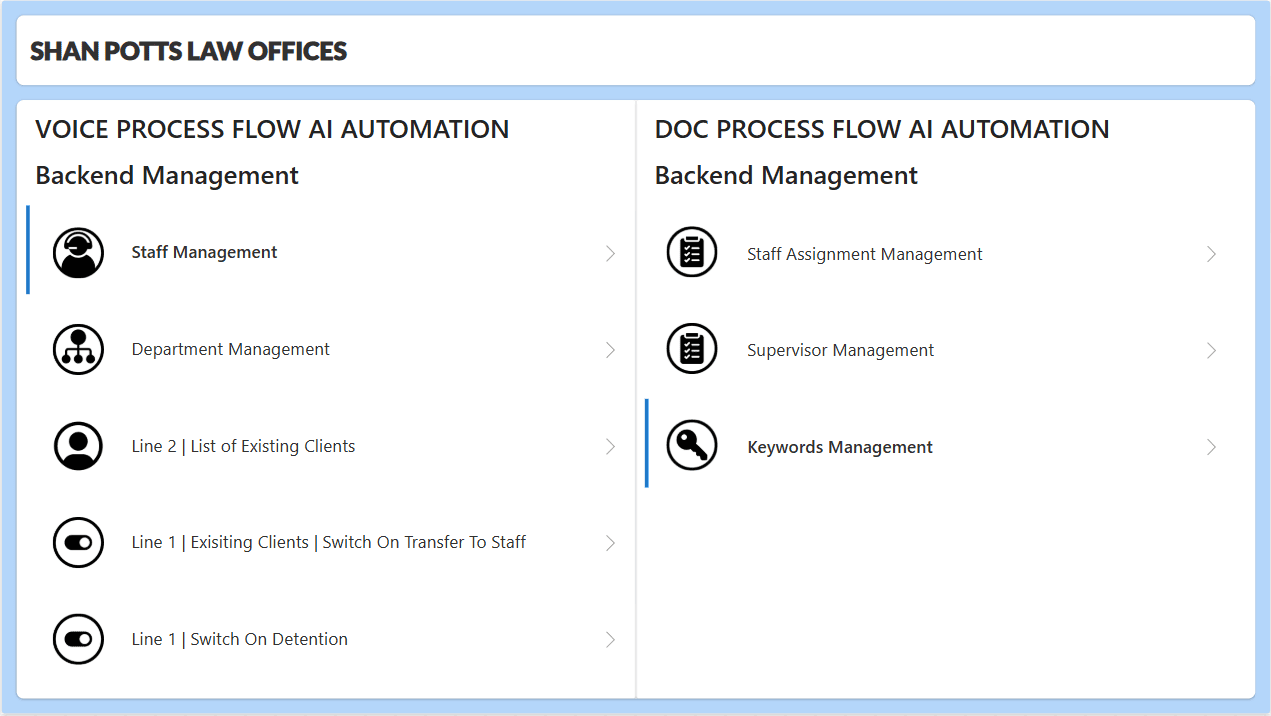
Main menu
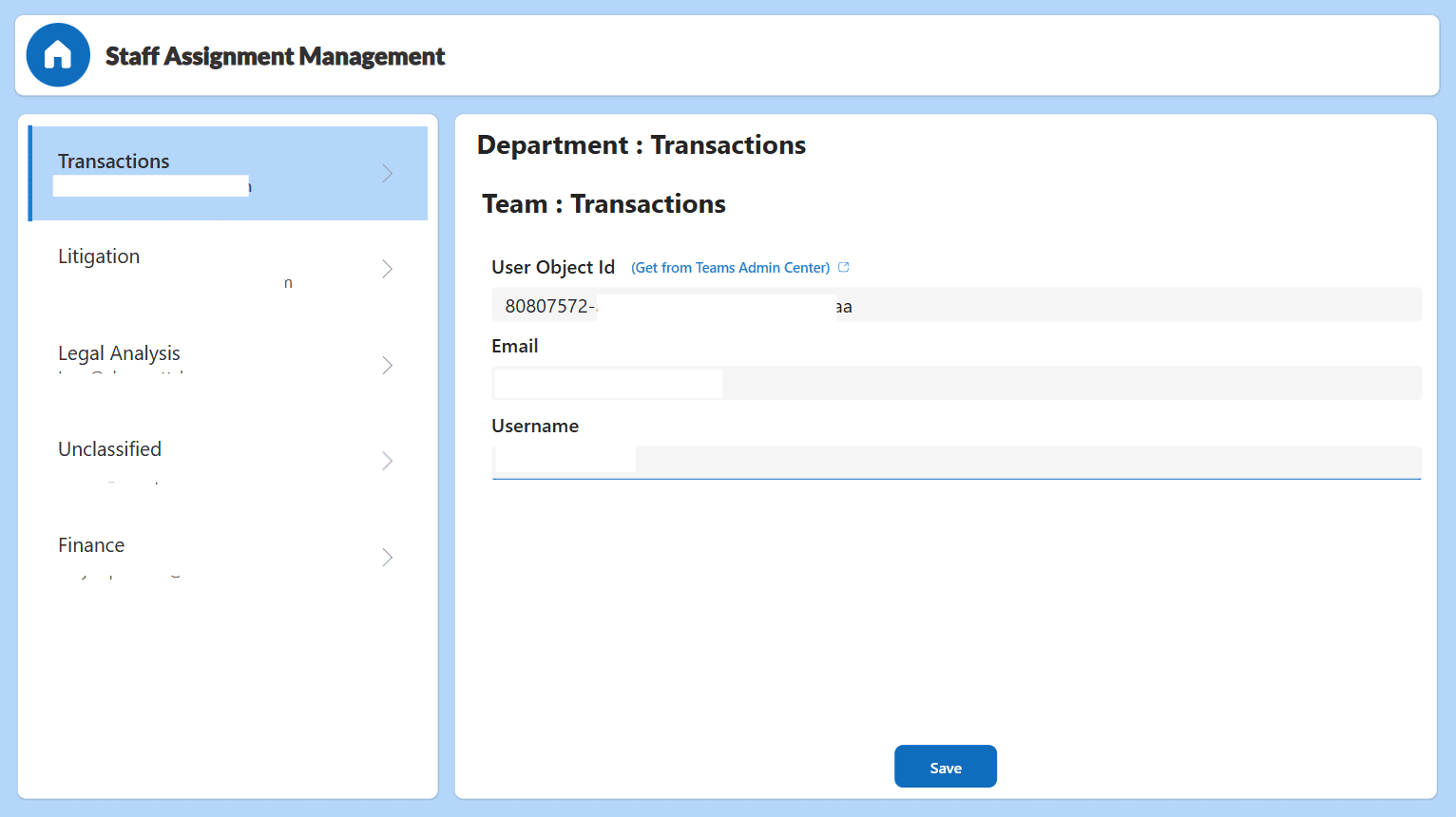
Staff assignment management
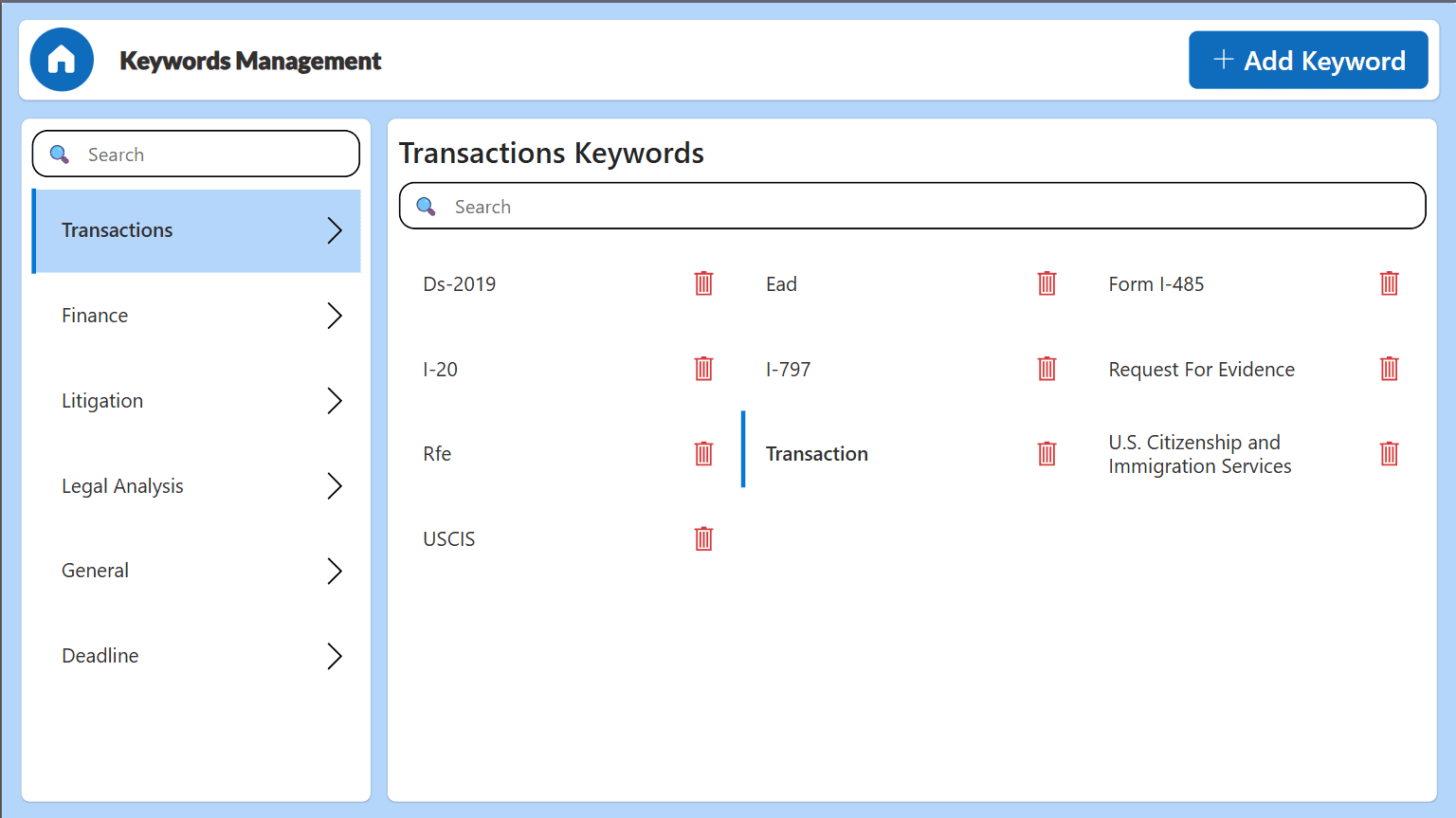
Keyword management
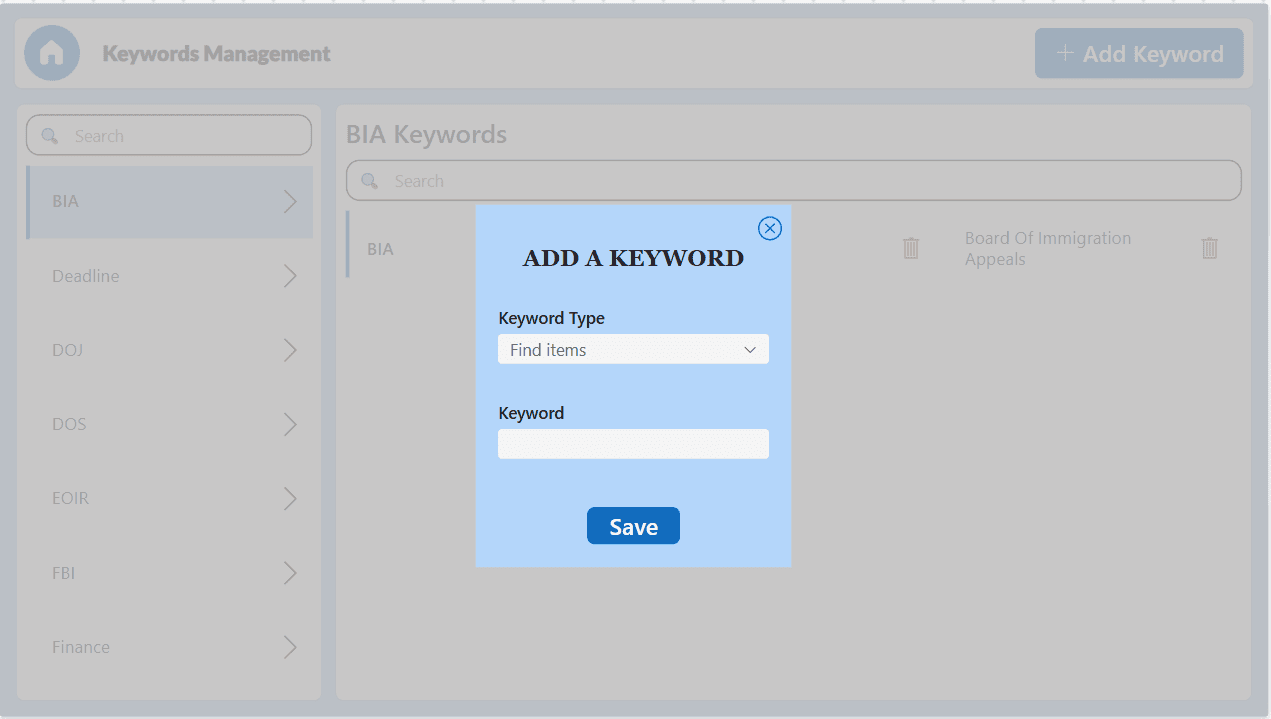
Adding new keywords
What changed, in practice.
The system didn't just move work off staff's plate — it changed what clients could get done on their own, and what leadership could see at a glance.
Client access never closes
The dedicated holiday and after-hours line means no call goes fully unanswered — even on a Sunday.
Self-service case status
One keypress sends a status link by text, cutting down the "just checking in" calls that used to reach staff.
Every document finds a desk
Keyword routing sorts USCIS notices from DOJ letters and opens the Planner task before a human opens the file.
Deadlines get a safety net
Anything inside a 7-day window escalates straight to the named supervisor, not a shared inbox.
Language is never a wait
Spanish- and Tagalog-speaking clients self-serve in the call flow instead of waiting for a bilingual staff member.
Leadership sees it live
Power BI dashboards give a real-time read on call and document volume, instead of relying on memory.
Staff time back on casework
With routine intake and mail sorting automated, the team spends less time triaging and more time on clients.
Snail mail joins the pipeline
Scanned paper correspondence runs through OCR on request, folding it into the same automated flow as email.
Every call and every document, tracked in real time.
The same dashboards leadership checks daily — call volume by attendant, document throughput, and comparative trends across both automations.
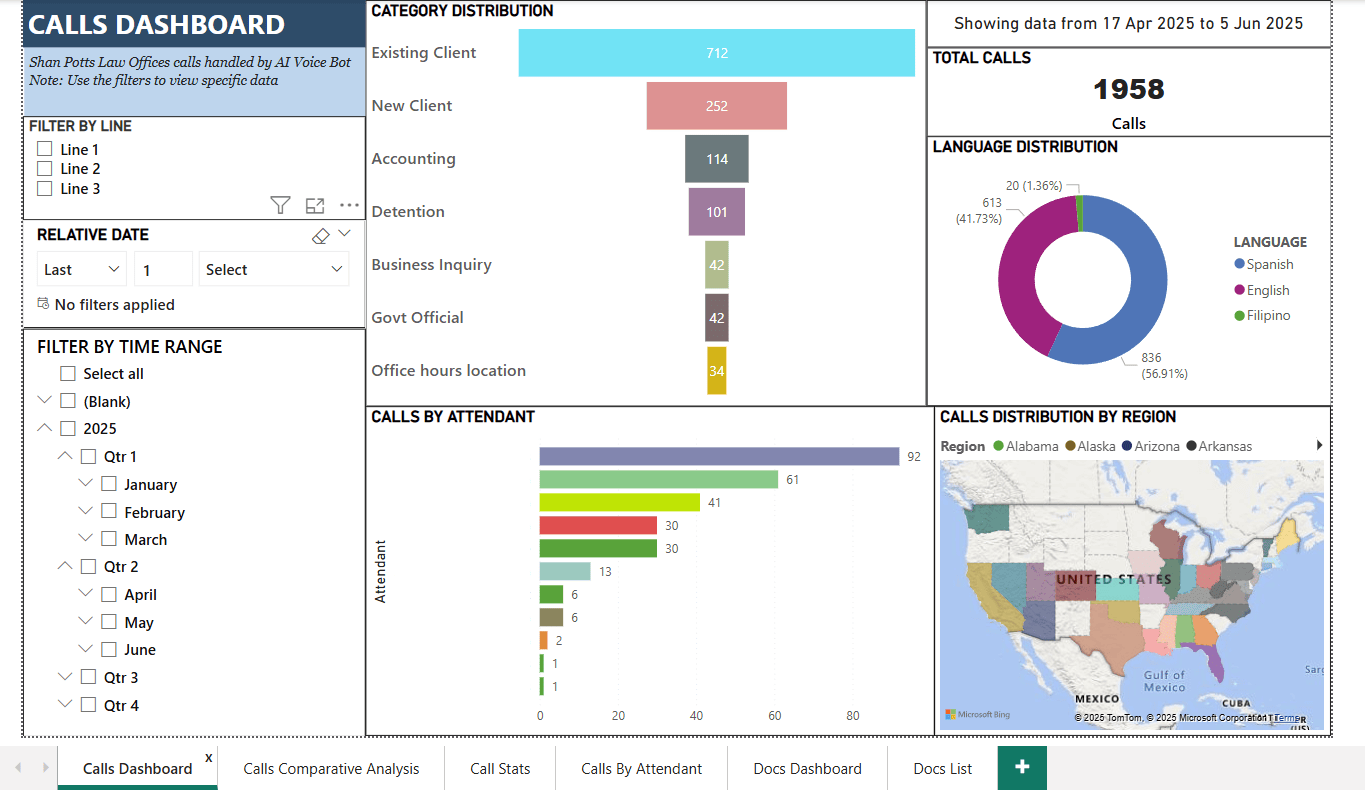
Calls dashboard
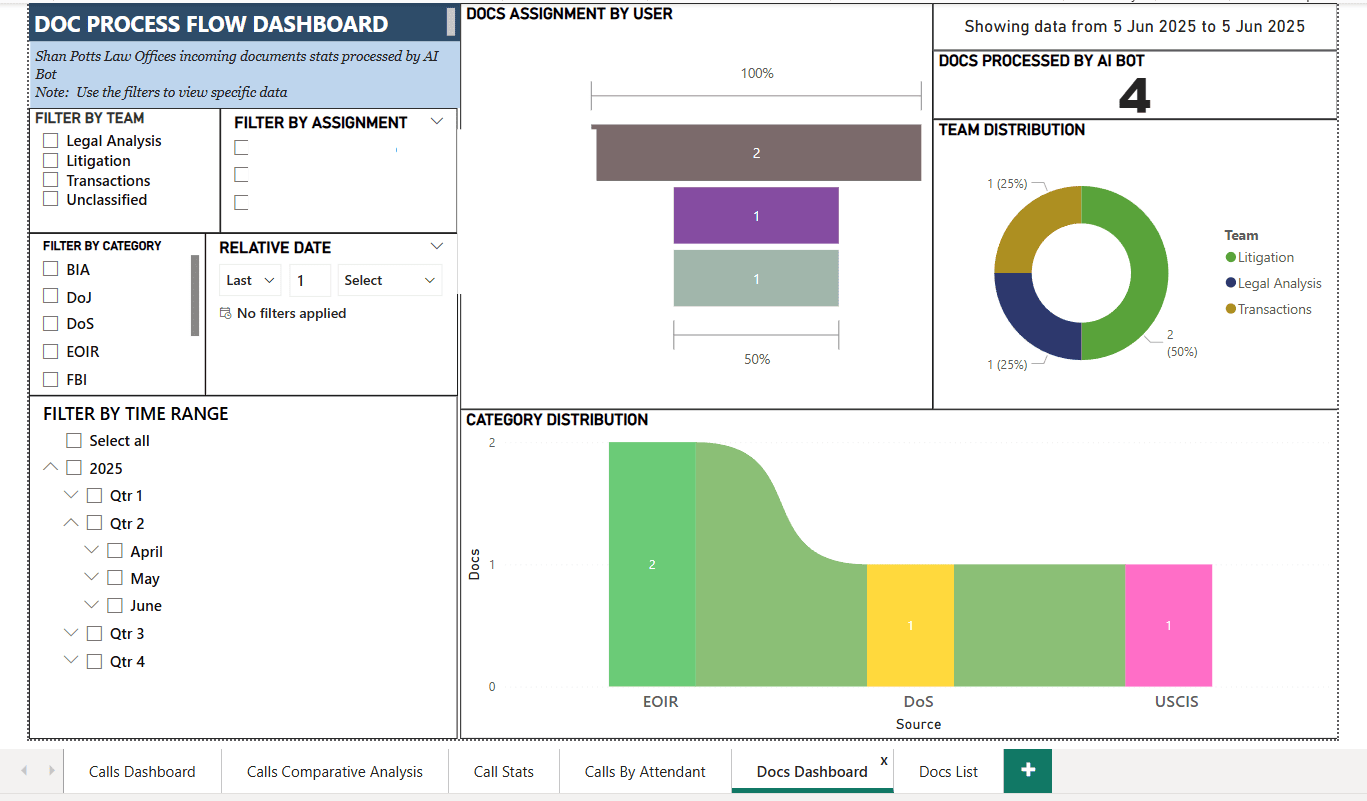
Doc dashboard
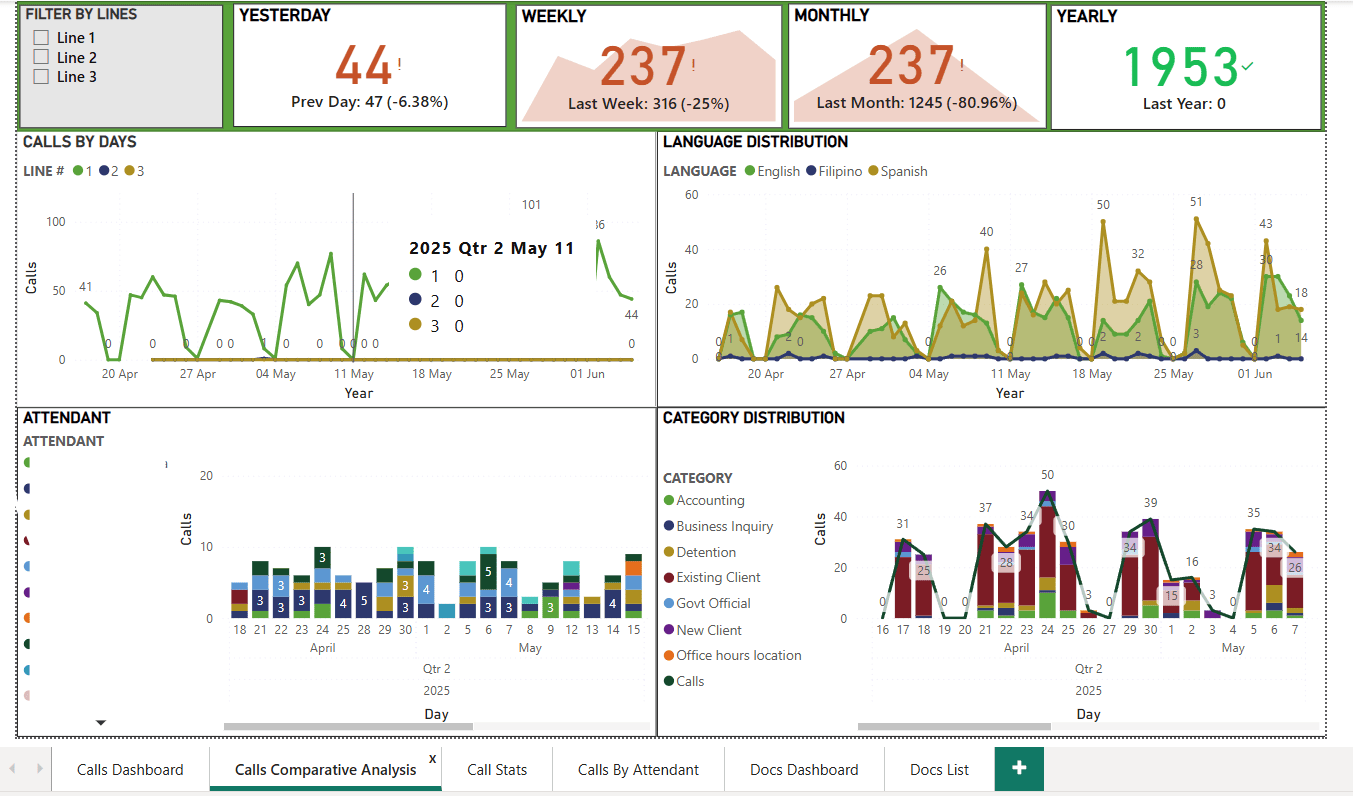
Calls comparative analysis
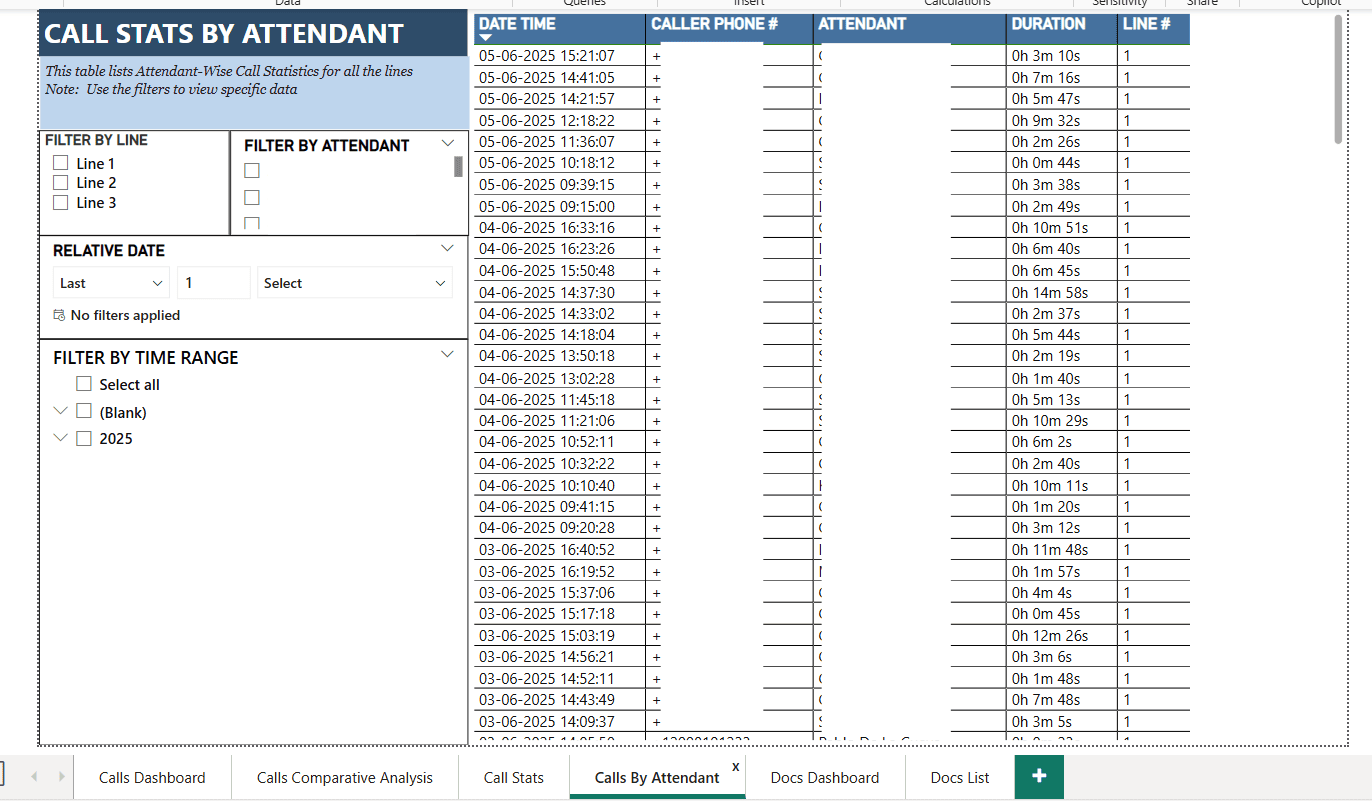
Calls by attendant
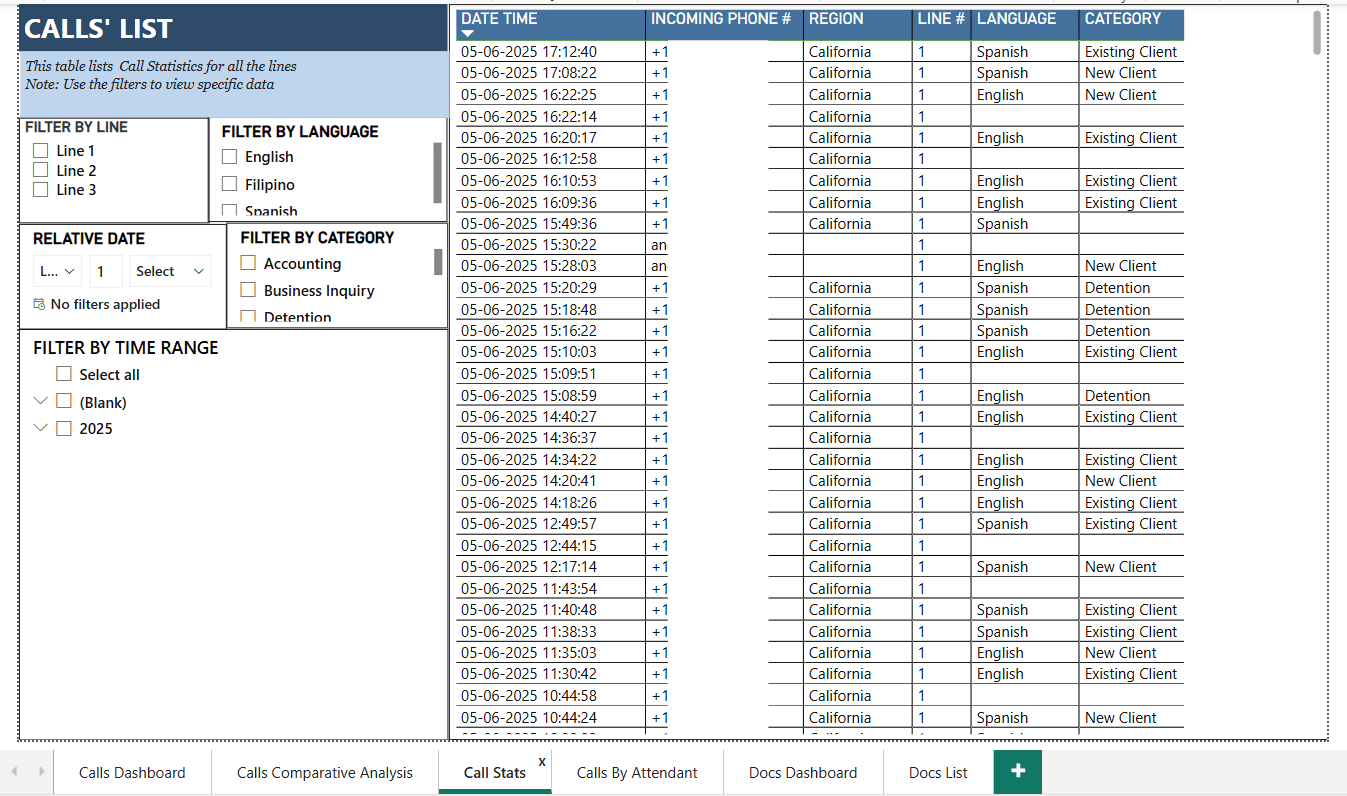
Call stats list
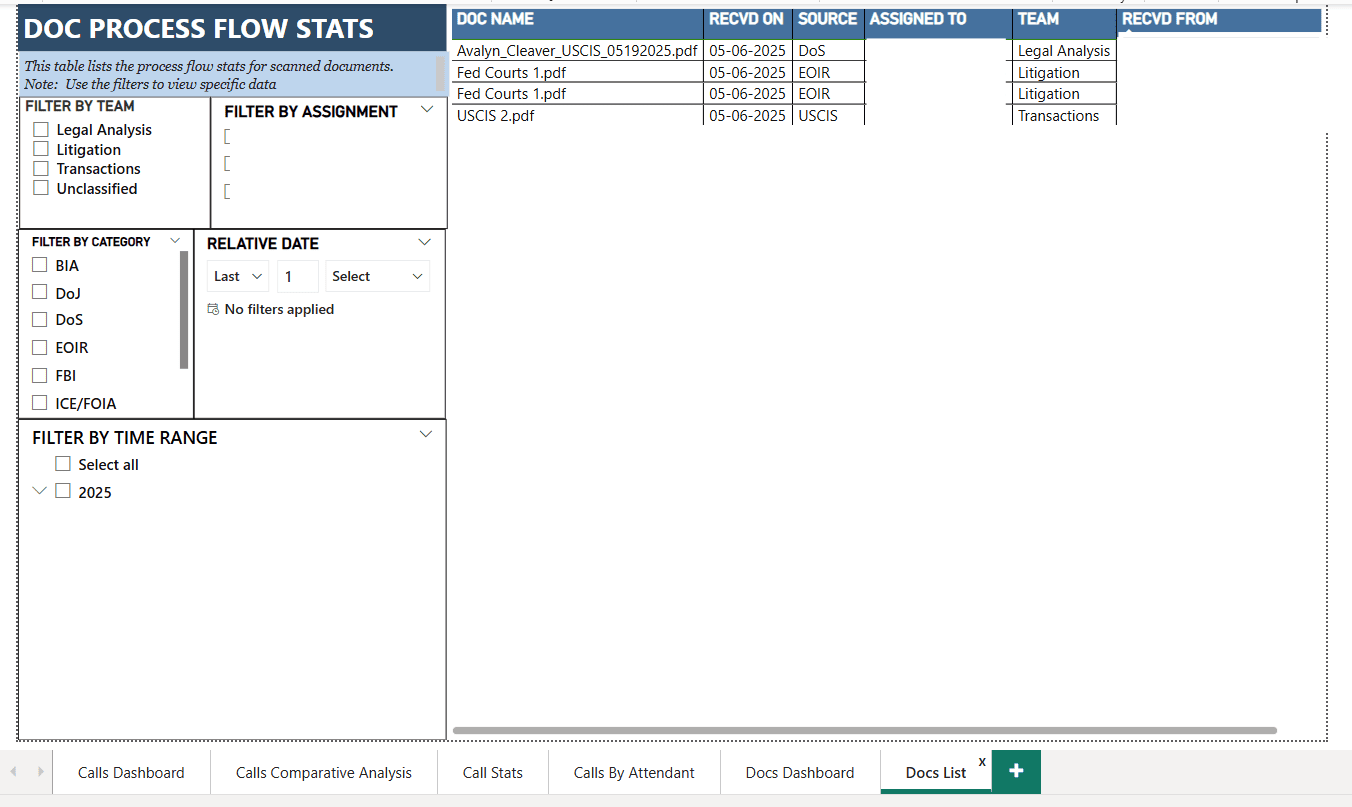
Doc list
Hear it from the team living with the system every day.
Rather than paraphrase the feedback, here is a video testimonial presented by Shan Potts himself, sharing insights after the automation had been running client calls and case mail for several months.


